Review designs from Slack
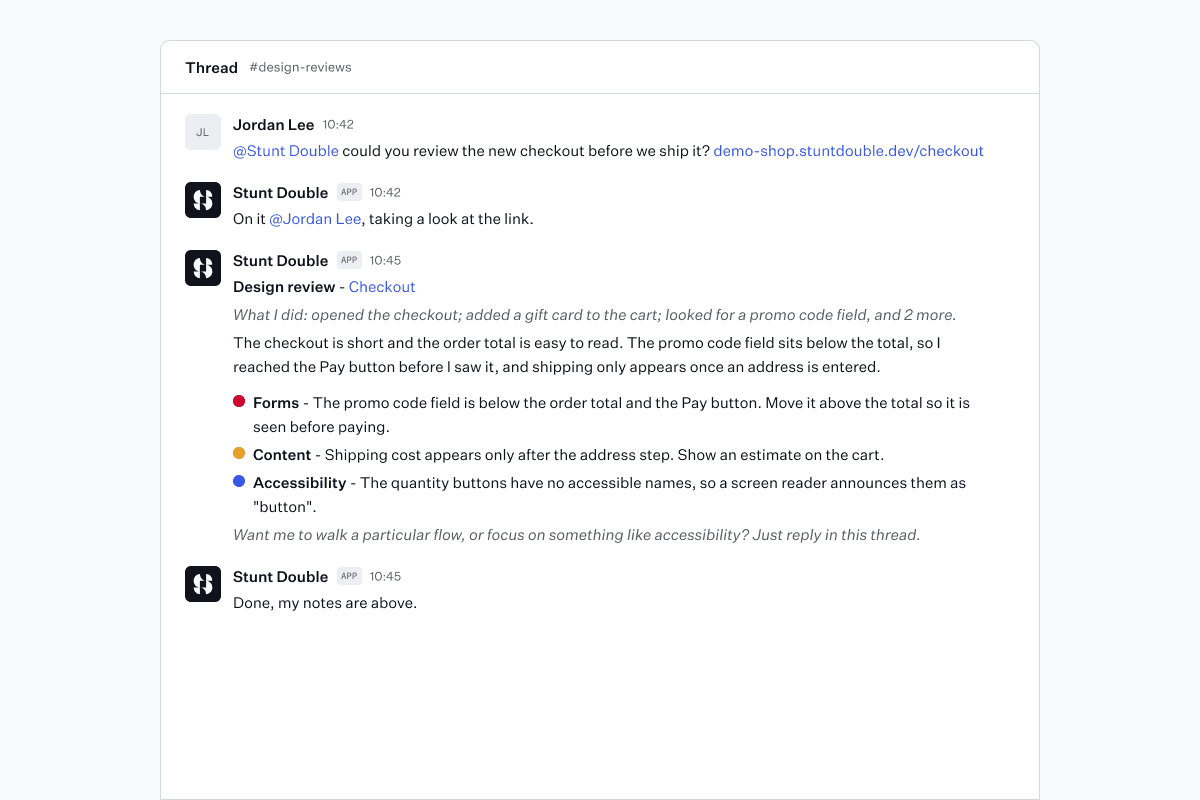
Someone drops a staging link in the design channel and asks what everyone thinks. Two days later there is one reply and nobody has opened it. Connect Slack to Stunt Double and that message gets an answer in the thread: the screen opened in a real browser, looked at, and written up with the problems ranked.
One Slack app covers two jobs.
Design review watches for a message that carries a link and reads like a request for feedback, then replies in the thread with a summary and prioritized findings.
The agent handles the rest of the conversation. Message Stunt Double directly, or @mention it in a channel, and it answers questions about your workspace and starts checklists and workflows for you.
1. Connect Slack
Install the Slack agent and add it to your workspace as Slack describes. The first two steps there are all a review needs: from the moment the connection exists, anyone in your Slack team can message Stunt Double directly and ask for one. Channels are optional and covered in step 4.
Review settings live on the Settings tab of Design review in the sidebar, beside the Reviews list and your Guidelines.
Figma links need one extra: connect Figma and Figma frames are rendered and reviewed. Without it, a Figma link comes back with a Connect Figma button instead of feedback. Web links are reviewed either way.
2. Ask for a review
A review starts when a message carries a link and reads like a request for feedback. Both halves matter: people paste links all day, and a review opens a real browser and calls a vision model.
Phrasings that count as asking:
- Can I get some feedback on this?
- Design review please
- Thoughts on the new onboarding screen?
- wdyt
- Take a look when you get a chance
- Any comments before I ship this?
Where you post decides how explicit you have to be:
| Where | Starts a review when |
|---|---|
| A direct message to Stunt Double | a link and a request phrase |
| A channel with design review turned on | a link, and a request phrase or a mention |
| Any other channel it has been invited to | a link, a mention, and a request phrase |
| A reply in a thread that holds a review | the reply is addressed to us, see below |
The last row is what keeps mentions predictable. "@Stunt Double run the checkout
checklist against https://..." is a request for a checklist, so it goes to the
agent rather than coming back as a design review.
A reply inside a thread is different. If the thread already holds a review, a reply continues it: the reviewer opens the product again, carrying what it already found plus whatever you just said ("walk the whole checkout", "try it signed out"). That is how you steer a review without repeating yourself, and it is why a reply does not need a link or a request phrase.
It also means a reply costs a review. In a channel with design review turned on, every reply in a review's thread is treated as addressed to us, so a thread where three people talk through the findings is three more reviews. Somewhere else the bot has simply been invited, a reply only continues the review when it mentions the bot or answers a question the bot asked. If you want to talk about a review rather than extend it, do it outside the thread, or in a channel that does not have design review turned on.
Up to three links from a single message are reviewed. Anything past that is ignored, so one message cannot spend an afternoon of browser time.
3. What comes back
The thread answers immediately, before any work has started: "On it, taking a look at the link." It stops short of promising feedback on purpose, because the next thing it says might be a question. That same message is then edited in place as the review progresses, so the thread holds one message that keeps up to date rather than a progress log. In a direct message there is no status message at all: Slack's own loading indicator carries the progress and clears itself when the review lands.
The bot may ask one question first. It opens the first link and looks at it before deciding, so if the page is behind a sign-in wall, or the request could mean any of several flows, it turns that same status message into a single short question with up to three quick-reply buttons. Click one or just reply in the thread; either way the review starts from your answer. Nothing is left hanging in the background while it waits, so an unanswered question costs nothing.
Otherwise it reviews straight away. A web page is reviewed by using it: the reviewer drives a real browser, opens menus, fills forms and walks the flow, and the reply names the screens it went through. Where it cannot do that (a Figma link, a page that will not open), it falls back to reviewing what it can capture.
When it captures instead of driving, that happens per link:
- A web page is opened in a hosted browser and captured from the top down, several screens' worth. Deliberately not the full page: a page capture 20,000 pixels tall is downscaled into an unreadable strip before a model ever sees it, which is the worst possible input for a review of the visual design.
- A Figma link is rendered through your workspace's Figma connection. A URL that names a node renders that frame; without one, the file's first frame.
The reply is a short summary and then the findings, most serious first. Each finding carries a severity (critical, issue, suggestion, info) and a category (usability, accessibility, visual, content, interaction, performance). A long review is trimmed to the top eight findings with a count of what was left out, so the thread stays readable.
A link that cannot be opened costs that link, not the review: the others still come back, and the thread says which one failed and why.
4. Turn it on in a channel
Direct messages work on their own. A channel is for teams that share work in the open, where nobody should have to remember to mention a bot.
On the Settings tab of Design review, add the channel under Channels. Every message posted there that carries a link and asks for feedback then starts a review, with no mention needed.
Two things have to be true for that channel to work, and the settings page checks both against live Slack state rather than a stored flag:
- The bot is in the channel. Run
/invite @Stunt Doublein it. Slack only delivers messages from channels the app has joined, so without this the channel looks configured and silently never fires. - The connection can read messages there. Being mentioned in a channel is a different permission from reading it, and public and private channels differ again. A connection made before the permission was requested keeps its old grant, so the page shows Reinstall to watch channels and names the channel it affects.
Try it on the same page posts a request in the channel as the bot and reviews it, so you can watch the whole flow before asking your team to use it.
Turning a channel off removes the automatic behavior, not the feature: an @mention with a link and a request still starts a review anywhere the bot has been invited.
5. Ask for anything else
Anything that is not a link plus a request for feedback, such as "run the checkout checklist", goes to the Slack agent instead of the reviewer. What it can do is on the Slack page.
When nothing happens
Slack failing quietly is the normal failure here, so work down this list in order:
- The message has no link, or no request phrase. Both are required on every surface. Add "can I get some feedback on this?" and post it again.
- It was a reply in a thread nobody has reviewed yet. A reply only starts a review when the thread already holds one. Post the link as a new message.
- The bot is not in the channel. Run
/invite @Stunt Doublethere. - The workspace is over a usage limit. The thread says which limit was hit rather than going silent.
If direct messages or channels get no answer at all, the connection itself is the problem: see Troubleshooting.
Reviews and agent runs are metered against your plan like any other browser work, plus the tokens the review spends. A review that drives the page uses one browser session for the whole thing, however many links the message carried; one that falls back to capturing screens uses one per link.
Tips
- Turn design review on in the channel where work already gets shared, rather than making a new one. The point is that nobody changes what they do.
- Ask for the review before the internal critique, not instead of it. It clears the obvious contrast, hierarchy, and label problems so your team spends its time on the decisions that need judgment.
- Link your Slack identity under your notification preferences if you plan to start runs from Slack. Attribution costs nothing to set up and cannot be backfilled.
- Send a Figma link with a node selected. The frame you are asking about beats the first frame in the file.
Next steps
- Write checklists that catch real regressions to turn a review finding that keeps coming back into a check that runs on every deploy.
- Collect stakeholder feedback on a prototype to gather comments in context from the people reviewing the same screens.
- Automate Stunt Double from Claude for the same read and dispatch surface in an assistant rather than in Slack.