MCP server
Deploy AI user personas to validate user journeys at scale. Find UX friction before real users do.
Stunt Double deploys AI agents with realistic user personas to validate user journeys at scale. Create actors, run automated workflows and checklists against any web app, and surface friction points before real users encounter them. Integrates with Claude, Linear, GitHub, and Slack.
Connect a client
- Claude Code
- Claude Code plugin
- Claude (web, Desktop, mobile)
- ChatGPT and Codex
- Codex CLI
- Gemini CLI
- VS Code (GitHub Copilot)
- OpenCode
- Windsurf
- Other clients
- Cursor
- From the Stunt Double app
Contents
- This repository
- Quick Start: Claude Code, Claude Code plugin, Skills, Claude, ChatGPT and Codex, Codex CLI, Gemini CLI, VS Code, OpenCode, Windsurf, Other clients, Cursor
- Stunt Double Studio: Hooks, Local or cloud
- Authentication: What a connection can reach
- Available Tools: Account, Workspaces, Search, Projects, Guidelines, Actors, Knowledge, Conversations, Checklists, Workflows, Feedback, GitHub, Interviews, Prompts, Resources, Stunt Double Index
- Example prompts: Demo targets
- Privacy Policy
- Support
- Transport
- MCP Registry
- Links
- Verifying changes
- License

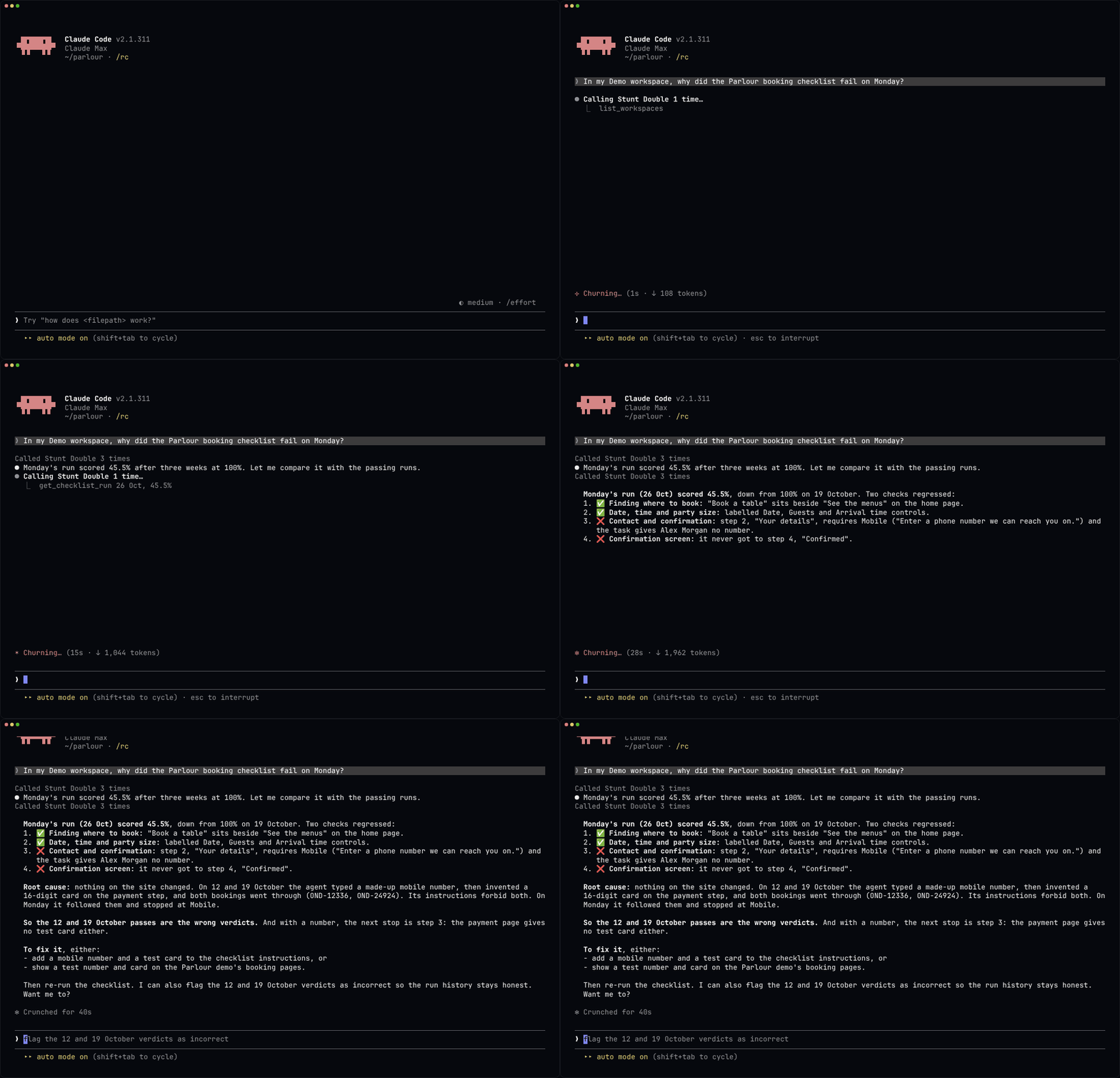
Stunt Double Studio
Run checklists against localhost, staging or production from Claude Code, free and with no account. Your own Claude Code session is the actor: the plugin's local server drives a local Chrome, keeps each run as files in your project and serves a viewer where you watch a run live or stop it. Local runs count against your Claude plan, or your API key when Claude Code uses one; Stunt Double makes no model calls.
Install the Claude Code plugin, then:
| Command | What it does |
|---|---|
/stuntdouble:setup | Readies the project: finds the dev server, drafts an actor and checklists from your routes, and adds the CLAUDE.md notes, tool permission and hooks, each change shown before it is written |
/stuntdouble:run <checklist> [resume] | Runs the checklist in a local Chrome and reports each failed check with its evidence |
/stuntdouble:open | Opens the viewer: every run with its verdicts, screenshots and activity |
/stuntdouble:cloud <checklist> | Pushes the same actor and checklist to a Stunt Double workspace, runs it there and pulls it back |
/stuntdouble:doctor | Checks Node, Chrome, the viewer port and how local runs are billed |
A run is carried out by the stuntdouble:stuntdouble-actor subagent, whose only tools are the local browser and run tools, so page text and screenshots stay out of your main conversation. Those tools are navigate, read_page, find, get_page_text, click, type, form_input, key, scroll, screenshot, start_run, evaluate_check and finish_run; the server's open_ui returns the viewer link. The local server is npx stuntdouble@0.1.3 mcp (source), pinned to an exact version in each plugin release. Claude Code starts it with each session (npx adds about 1.5 seconds), and the browser and viewer start only on the first run. It needs Node 22.18 or later and Google Chrome (or Playwright's Chromium). On native Windows the server does not start yet, since Claude Code needs cmd /c npx there: use WSL.
Everything lives in .stuntdouble/: stuntdouble.json, hooks.json, actors/, checklists/ and runs/, each run with its run.json, an activity.jsonl of every action and a screenshot per verdict. Actors and checklists are the hosted create_actor and create_checklist inputs, so /stuntdouble:cloud pushes them unchanged (except browser_config, which the cloud does not take yet, so cloud runs use the default desktop browser) and writes the cloud ids back. Commit the folder (its .gitignore leaves out .live/) and your team gets the same checklists and run history; npx stuntdouble view opens the viewer over it without Claude Code.
Hooks
/stuntdouble:setup also writes .stuntdouble/hooks.json, which switches on two Claude Code hooks that ship in the plugin (hooks/hooks.json). Without that file they do nothing, in well under 100 ms.
| Hook | When | What it adds to the session |
|---|---|---|
session_summary | Session start | The project's checklists, the latest run's outcome and pass count, and that /stuntdouble:run is there |
suggest_after_edit | After an Edit, Write or MultiEdit to a UI file | A note to offer the checklists that cover the file before finishing, once per checklist per session. Never starts a run |
{
  "format": "stuntdouble.hooks/1",
  "session_summary": true,
  "suggest_after_edit": true,
  "ui_globs": ["app/**/*.{tsx,jsx,css}", "components/**/*.{tsx,jsx}"],
  "checklists_for": { "checkout": ["app/checkout/**", "components/cart/**"] }
}
ui_globs decides which edits count as UI changes; checklists_for maps a checklist to the files it covers, and an edit no entry matches suggests the rest once per session. Edits made inside a subagent are skipped. Globs are relative to the project root and take **, *, ? and {a,b}. To switch a hook off for the project, set it to false; to switch both off, delete the file. The file is committed with the rest of .stuntdouble/, so to switch the hooks off for yourself only, set STUNTDOUBLE_HOOKS=off in your shell or under env in .claude/settings.local.json. The hooks are Claude Code only: the Cursor plugin and the ChatGPT and Codex package leave them out.
Local or cloud
| Local (free, no account) | Cloud | |
|---|---|---|
| Model | Your Claude Code session and plan | Stunt Double's managed models; your plan untouched |
| Browser | Local Chrome, a fresh profile per run, logins kept only if opted in | Hosted browsers with proxies, locations, recording, live view and person-steered assists |
| Targets | Localhost, intranet, staging, production | Public URLs; private ones through devices on Startup |
| When | One run at a time while your session is open | Parallel, unattended and scheduled; deploy, PR and Figma triggers; workflows |
| Verdicts | Self-judged by the actor, citation-checked, scored as in the cloud | An independent result judge, carry-over notes, corrections, comparison and alerts |
| Team | Git, with the cloud ids in the files | Seats, shared reports, Slack, Linear and GitHub PR comments |
| Research | Checklists | Interviews, design reviews, synthesis and Index scoring |
See pricing for the cloud plans. The local server runs only in Claude Code for now: the Cursor mcp.json and the ChatGPT and Codex package carry the hosted server alone.
Authentication
Authentication is handled automatically via OAuth 2.1 with PKCE. The first time your AI client connects, a browser window will open for you to sign in and authorise access to your Stunt Double account. No API keys or tokens required.
For Cursor, the OAuth redirect URI is fixed to cursor://anysphere.cursor-mcp/oauth/callback (docs).
What a connection can reach
The server acts as you, never more. Every tool resolves the workspace it is
being asked about and checks your membership of it before doing anything, so a
connection reaches exactly the workspaces list_workspaces returns for you, and
an archived workspace reaches nothing. A workspace you are not a member of
answers the same way one that does not exist does: "not found".
That holds for ids too, not just the workspace_id you pass. A tool that takes
another object's id (a checklist for an automation step, an actor for an
interview participant) checks that object belongs to the same workspace before
storing or running it, and refuses with "not found in this workspace" otherwise.
Refusals never say which workspace an id does belong to.
Scopes narrow this further, never widen it. The consent screen names what the
connection asked for, and a token granted mcp:read is not shown the write or
run tools at all: they are absent from tools/list rather than present and
failing.
| Scope | What it allows |
|---|---|
mcp:read | Read your workspaces and their contents |
mcp:write | Create and edit content in your workspaces |
mcp:run | Start checklist runs, automation runs and interviews, which consume the workspace run allowance, re-run Stunt Double Index scores for domains you own, and add sites the Index does not track yet |
Example prompts
Four prompts that exercise the core of the server once it is connected:
- Verify a flow: "Create a checklist that completes the checkout on https://checkout.demo.stuntdouble.io and reaches the confirmation page, then run it and tell me which checks failed."
- Run a user interview: "Set up an interview with three personas (a first-time diner, a regular and a screen reader user) about booking a table on https://parlour.demo.stuntdouble.dev, launch it, and summarise the report."
- Check agent readiness: "How well can AI agents use stripe.com according to the Stunt Double Index, and which categories are dragging its score down?"
- Triage feedback: "Summarise the open feedback on my main project, group it into themes, and mark anything already fixed as resolved."
Demo targets
Try the server without pointing it at your own product. These public demo apps have deliberate defects for actors to find, so runs never touch real customers:
| App | What |
|---|---|
| checkout.demo.stuntdouble.io | Trailhead Outfitters: a one-page checkout |
| flights.demo.stuntdouble.io | Skyline Fares: one-way flight search, results, booking and confirmation |
| parlour.demo.stuntdouble.dev | Ondine, on Parlour: a restaurant booking flow with a deposit |
Privacy Policy
The server is hosted by Stunt Double and acts as the signed-in user. It reads and writes only the workspaces that user belongs to, within the OAuth scopes they grant (mcp:read, mcp:write, mcp:run). It does not read your conversation with the AI client beyond the arguments passed to each tool call, and it does not access the client's memory, chat history or files.
Data created through the server (projects, actors, checklists, runs, interviews, feedback) is stored in your Stunt Double workspace and handled under the Stunt Double Privacy Policy, which covers collection, use, storage, sub-processors, retention and your rights. Revoke a connection at any time by disconnecting it in your AI client.
Support
- Email: support@stuntdouble.io
- Help centre and docs: stuntdouble.io/support
- MCP reference: docs.stuntdouble.io/api/mcp
- Security reports: see SECURITY.md
Transport
This server uses Streamable HTTP transport. The endpoint is:
https://app.stuntdouble.io/api/mcpMCP Registry
The server is listed in the official MCP Registry as io.stuntdouble/mcp-server, so registry-backed clients and directories can find it by name:
curl "https://registry.modelcontextprotocol.io/v0.1/servers?search=io.stuntdouble/mcp-server"