Write checklists that catch real regressions
A checklist is only as useful as the checks inside it. This tutorial covers how to write checks that hold up over time, decide what each one is worth and order them, so a "failed" verdict tells you something you can act on.
- Time
- 20 minutes
- You need
- An actor and a URL
- Next
- Review runs and act on them
Start from a template
Create checklist opens on categories first: Core & reliability, Onboarding & activation, Conversion & growth, Forms & input, Accessibility, Mobile & responsive, Content & trust, and Navigation & findability. Pick a template to start from its checks, or Start from scratch for a blank one. The next two steps name the checklist, choose the URL and actor, then let you edit the checks before you create it. Treat a template's checks as a first draft: the rest of this tutorial is about making them specific to your product.
Write one check per outcome, not per click
A check is a single description of what should be true. It's tempting to write mechanical, step-by-step instructions, but checks written that way break the moment your UI changes, even when the underlying behavior didn't:
- Weak: "Click the discount field, type SAVE10, click Apply."
- Strong: "Confirm the cart shows the discounted price after applying code SAVE10."
The strong version tells the actor what outcome to verify and leaves it to work out how to get there, which is exactly what makes checklists resilient to redesigns.
Point checks at the moment that matters
Group checks around the state that actually needs verifying, not the navigation that gets you there: the confirmation screen after checkout, the inbox after a signup, the dashboard after a plan change. If a flow has several outcomes worth confirming, write a check for each one rather than one check trying to cover all of them.
Choose what each check is worth
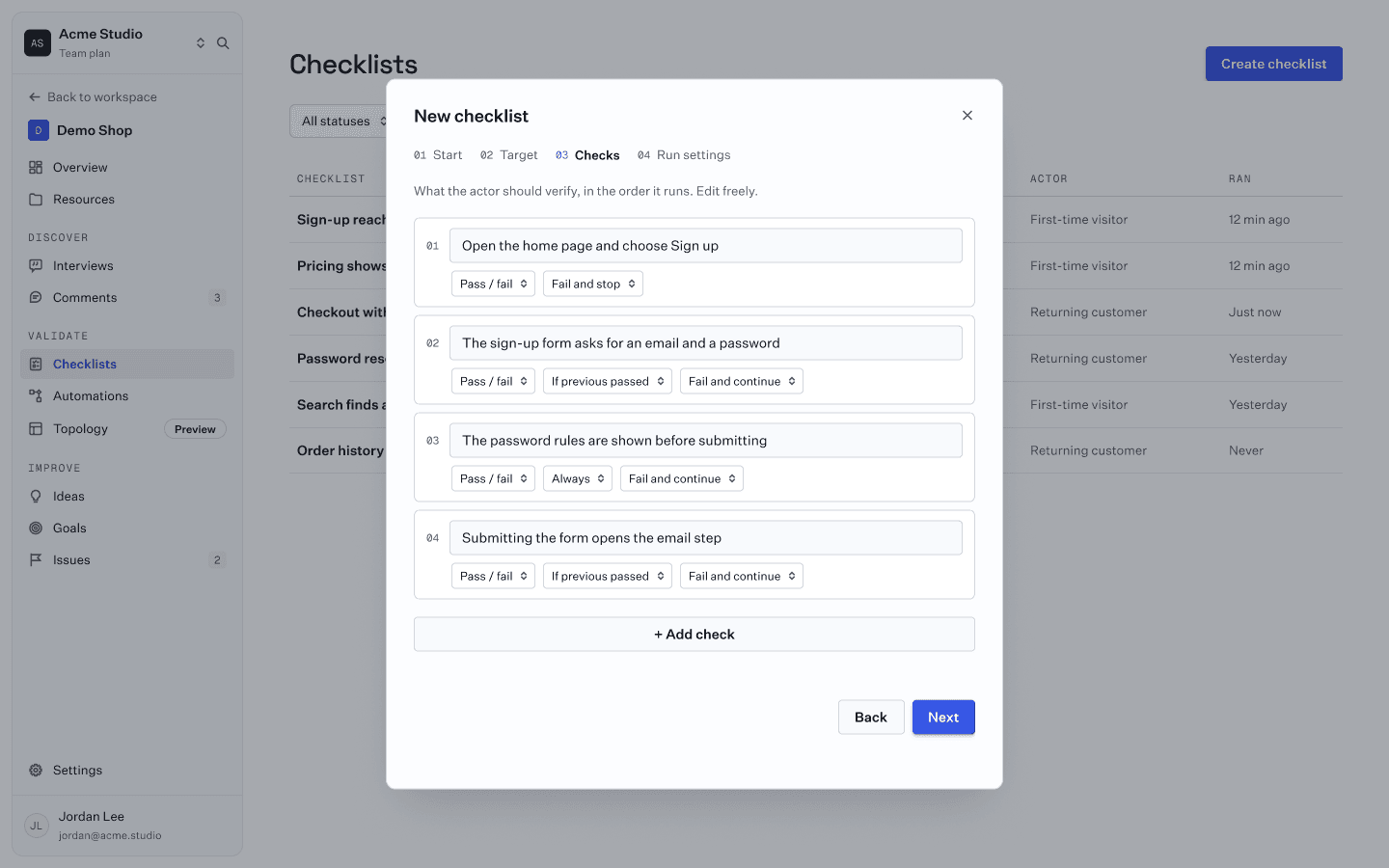
Not every check deserves to stop a release. Each one has a type, set in the create dialog or the flow editor's inspector:
- Pass / fail is blocking. One failure fails the whole run. Use it for the things that must work: checkout completes, the signup email arrives.
- Weighted contributes its weight to a run score rather than blocking. Weights run from -100 to 100, default 1, so "checkout completes" can outweigh "the footer year is current". A weight below zero is a penalty: it adds nothing when the check passes and deducts that many points when it fails, without raising the maximum. Phrase a penalty as what should be true ("no placeholder text is left in the copy"), so passed still means good.
- Informational is never judged. The actor records what it observed ("the headline price is $29 per month") and that text is the deliverable, which is how drift in prices, copy or plan names gets caught between runs.
A checklist's Passing score decides the verdict for its weighted checks. It defaults to every point (100%), which reproduces the old all or nothing rule, so a checklist you already have behaves exactly as it did until you lower it.
The two hurdles are independent on purpose: no blocking check may fail, and the weighted score must reach the threshold. Folding pass/fail checks into the score would let "the user cannot check out" survive as long as enough cosmetic checks passed.
A check that errors is inconclusive rather than failed. A check the run never reached says nothing about your product, so it stays out of the score.
Writing a scoring rubric as a checklist
A rubric like "40 points for the core flow, 30 for clear messaging, 20 for accessible controls, 10 for visual polish, minus 20 for a blocking error, out of 100" is five weighted checks: four with those weights and one with a weight of -20. The maximum is the positive weights only, so the run really is out of 100. Partial credit ("15 if the messaging is only partly clear") is two checks of 15 rather than one of 30, since a check has one verdict.
Choose the Score type that matches how the rubric is written:
- Percentage (the default) scores the share of the available points a run earns, so "pass at 75%" keeps its meaning when you change the weights. The editor shows the points it works out to at the current weights (75% of 100 is 75 points).
- Points scores the points a run earns, as they are, so "pass at 60" stays 60 however the weights move. Name what the points count, such as "marks" or "stars", and runs report "62 marks" rather than a percentage. A penalty can take a points score below zero.
The passing score and grades are in the score type you choose, and switching type converts them at the current weights so the bar stays where it was. Under Grades, name the ranges a score can land in, best first: Optimal from 75%, Partial adoption from 37.5%, Pushed back below that. A run then reports its grade next to its score. Grades only label the score; the passing score still decides whether it passed.
Order the checks, and let one depend on the last
Checks run top to bottom. Drag a check vertically to reorder it, or use Move up and Move down in the inspector.
Order matters because a check can depend on how the one before it turned out. Set its run condition to:
- Always, the default: it runs whatever the check before it found.
- If previous passed, for a follow-up that only means anything once the step before it worked ("the confirmation shows the right total").
- If previous failed, for an inspection that is only reachable when the step before it broke ("the error message explains what to fix").
Without conditions, both shapes produce a misleading report: one failure counted twice, or a check that fails because the product worked.
A check's On failure setting decides what a failure does to the rest of the run. Fail and continue, the default, records the failure and carries on. Fail and stop ends the run there and records every check it had not reached as skipped. Use it for a step everything after depends on, like signing in, so one broken step does not show up as a page of knock-on failures. A check set to stop fails the run when it fails, whatever its type.
A check whose condition is unmet is recorded as skipped, naming the check it depended on, and left out of the score entirely. It did not fail, and it is not inconclusive either. A condition is only unmet when the previous check's verdict contradicts it: an antecedent that errored, or an informational one with no verdict at all, leaves the condition undecidable, and the check runs. Quietly testing less is the one outcome a testing product must never produce.
One thing to know before you reach for informational checks: they need the actor to read the page, so a checklist containing one always runs the full agent rather than replaying its recorded script.
Tighten a check that fails for the wrong reason
When a check fails, read its explanation and screenshot before deciding whether it is a real regression or an ambiguous check. A surprising number of failures turn out to be a check that needs to say more precisely what counts as success: "the order total is shown" passes on a page that shows the wrong total, while "the order total matches the cart total" does not.
Editing a checklist keeps its history: checks you did not touch keep their ids and their past results, so the next run is still compared with the last one. How to read a report, compare runs and re-run before you file a bug is covered in Review runs and act on them.